
Mobile PDF Tools PDFpen 2.5.2 and PDFpen Scan+ 2.2 Add Updated Performance from macOS Apps

Scan, OCR, send as a PDF
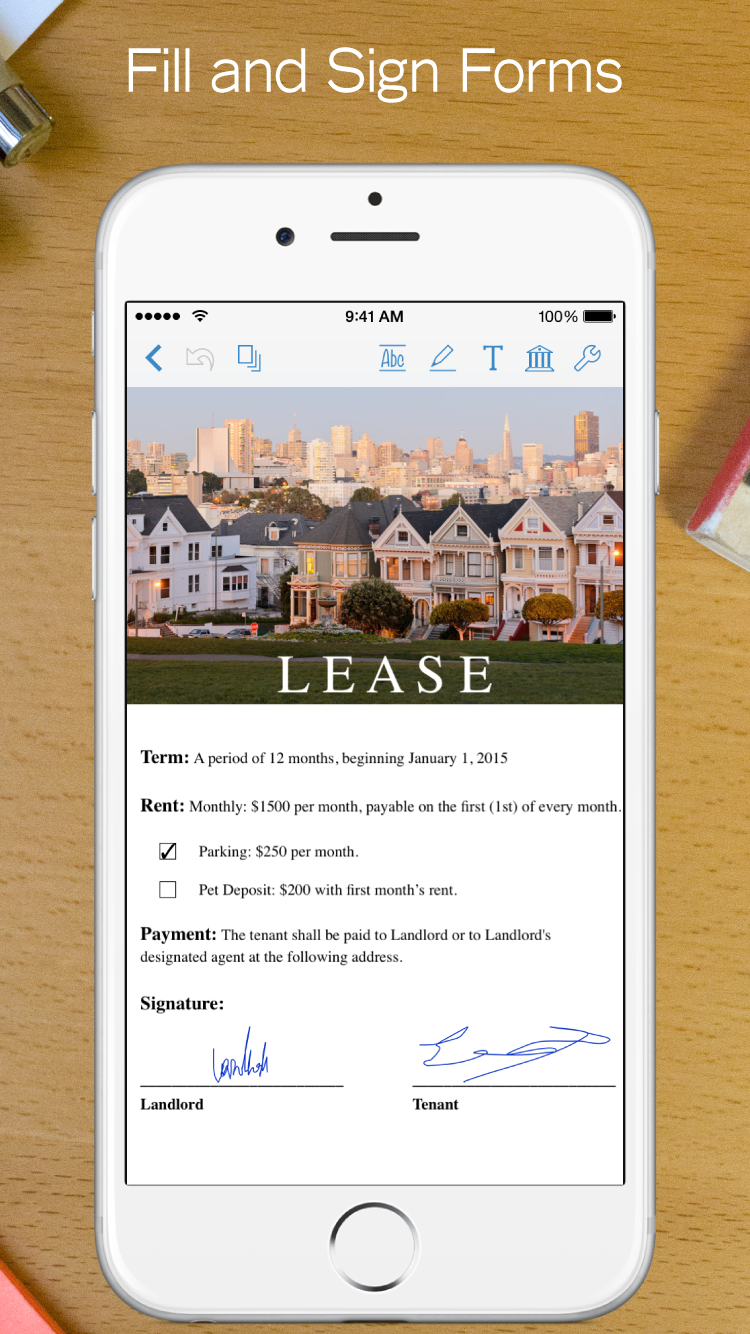
Sign PDFs, fill forms, sync with Dropbox from your iPhone
Get both apps 50% off their regular price in our bundle, limited time discount
SAN FRANCISCO, CALIFORNIA, UNITED STATES, June 23, 2017 /EINPresswire.com/ -- San Francisco, CA - June 22, 2017 - Smile, the developer of productivity applications for Mac®, iPhone®, iPad®, and Windows has released PDFpen for iPad & iPhone version 2.5.2 and PDFpen Scan+ version 2.2, both with enhanced performance using PDFpen 9 technology from macOS.For the next week, PDFpen 2 and PDFpen Scan+ are a combined 50% off, available in the PDF Business Kit for $13.99. Regularly, PDFpen 2 is $19.99 and PDFpen Scan+ is $6.99 on the App Store.
Both PDFpen 2 and PDFpen Scan+ include various fixes and improvements.
"This update brings more power and stability to our mobile apps, enabled by the work on our PDF editor, PDFpen 9, on macOS," said Philip Goward, Smile co-founder. " PDFpen 2, PDFpen Scan+, and our customers, all benefit."
PDFpen 2 and PDFpen Scan+ are part of a family of PDF editing apps. With PDFpen and PDFpenPro 9 on macOS, documents sync between devices for seamless editing via Dropbox and iCloud. Documents also sync between PDFpen 2 and PDFpen Scan+ via iCloud.
PDFpen 2 is regularly $19.99 on the App Store. PDFpen Scan+ is regularly $6.99 on the App Store. Find the PDF Business Kit for $13.99 on the App Store http://smle.us/bizkitdeal17
PDFpen is available for $74.95. PDFpenPro is $124.95. Both require macOS 10.11 (El Capitan) or later. Demo versions are available at https://smilesoftware.com/PDFpen
New in PDFpen 2.5.2:
- Enhanced performance using PDFpen 9 technology from macOS
- Various fixes and improvements
FEATURES
- Read and edit PDF documents on your iPad and iPhone
- Add highlights and freehand scribbles safely with palm/wrist protection
- Add text, images, and signatures to PDFs
- Correct text in original PDF via editable text blocks
- Fill out PDF forms, including specialized signature fields
- Email and Airdrop your documents, with an option to flatten documents for maximum compatibility
- Set a document password, which is then required when opening your document, and even set the level of encryption
- Save documents in iCloud & Dropbox synced storage for sharing between devices
- Retrieve and save PDFs directly with iCloud Drive, Dropbox, Evernote, Google Drive, Transporter
- Insert note, comment, and audio annotations
- Draw shapes, including lines, arrows, rectangles, ellipses, and polygons
- Move, resize, copy and delete images in original PDF
- Import images from iPad or iPhone Photo Library
- Annotate with proofreading marks and stamps
- Save frequently-used images, signatures, objects, and text for reuse
- Automatic page numbering including Bates numbering
- Validate digitally signed documents
- Search and skim page thumbnails, annotations, and tables of contents with the slide-out sidebar
- Duplicate and rotate pages
- Combine documents
- Organize your documents using Folders
- Support for pressure sensitive/Bluetooth styluses: Apple Pencil, 53 Pencil, Wacom, Jot Touch, Jot Script, Jaja, and Pogo Connect
- Integrated with PDFpen Scan+ for performing Optical Character Recognition (PDFpen Scan+ OCR is a separate purchase)
- Share PDFs with a computer via Wi-Fi; transfer files using iTunes, FTP, and WebDAV
New in PDFpen Scan+ 2.2:
- Enhanced performance using PDFpen 9 technology from macOS
- Various fixes and improvements
FEATURES
- Touch-free scanning on your iPhone or iPad camera
- Scan multiple images into a single document
- Detects page edges automatically when camera is focused and steady
- Camera automatically crops scan
- In-camera setting for color / grayscale / black and white
- In-camera setting for page size: from legal to business card, and receipts
- Auto export scans to Dropbox or iCloud Drive
- Use OCR (Optical Character Recognition) to convert scans into searchable PDFs (OCR is performed in-app, not sent to a cloud service)
- Preview and copy text recognized by OCR
- OCR documents in 18 different languages: Chinese (Simplified and Traditional), Danish, Dutch, English, Finnish, French, German, Italian, Japanese, Korean, Norwegian, Polish, Portuguese, Russian, Slovenian, Spanish, and Swedish
- Email and share PDF documents with embedded, searchable OCR text
- Import scans from your photo library
- Import scans from image and PDF files via "Open In..."
- Store documents in iCloud for sharing between devices
- Rotate scanned pages
- Organize documents in folders
- TextExpander touch support for renaming documents
- Adjust cropping/brightness/contrast of scanned pages
- Share documents with PDFpen for markup and editing
- Import and Export documents using Dropbox, iCloud Drive, Evernote, Transporter, and Google Drive cloud services
- Import and Export documents using iTunes, FTP, and WebDAV
- Works with both iPhone and iPad, iOS 8 required
System Requirements:
iOS 8 or later
Pricing:
PDFpen 2 is regularly $19.99
PDFpen Scan+ is regularly $6.99
Buy both apps in the PDF Business Kit for $13.99 for the next week:
http://smle.us/bizkitdeal17
For more information on PDFpen 2, please visit:
https://smilesoftware.com/PDFpen-ios
Icon, logotype, and screenshots:
https://www.smilesoftware.com/assets/images/uploads/PDFpenforiOS_graphics.zip
For more information about PDFpen Scan+ please visit:
https://smilesoftware.com/PDFpen-scan
Icon, logotype, and screenshots
https://smilesoftware.com/assets/images/uploads/PDFpenScan_graphics.zip
# # #
ABOUT SMILE
Smile makes clever software for efficient people, including TextExpander, the typing shortcut tool for Mac, Windows, iPhone and iPad; PDFpen, the all-purpose Mac PDF editor; PDFpen for iPad & iPhone, the mobile PDF editor; and PDFpen Scan+, which brings the power of scanning and OCR to your iPad and iPhone.
Demos of all Smile desktop products are available for free download at https://smilesoftware.com/
Smile. Software that's just right.
Follow Smile on Twitter:
https://twitter.com/SmileSoftware
CONTACTS:
Maia Olson (+1-510-599-7070, PST)
PR, Smile
E-mail: maia@smilesoftware.com
Greg Scown (+1-510-289-4000, PST)
Founder, Smile
E-mail: greg@smilesoftware.com
Philip Goward
Founder, Smile
E-mail: philip@smilesoftware.com
https://smilesoftware.com/
Smile
PMB 278
350 Bay St., Suite 100
San Francisco, CA 94133
+1-510-289-4000
Maia Olson
Smile, LLC
5105997070
email us here
Legal Disclaimer:
EIN Presswire provides this news content "as is" without warranty of any kind. We do not accept any responsibility or liability for the accuracy, content, images, videos, licenses, completeness, legality, or reliability of the information contained in this article. If you have any complaints or copyright issues related to this article, kindly contact the author above.
