
iSumsoft Updates More Advanced Windows 10 Password Recovery Tool - WPRefixer app

Windows Password Refixer for Android
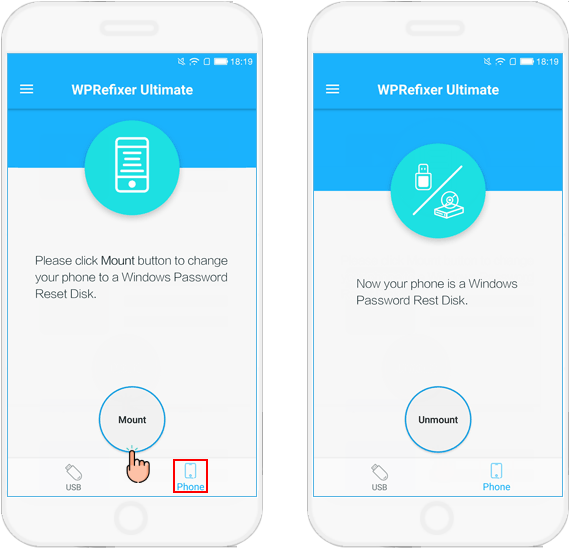
Create a Password Reset Disk on Android
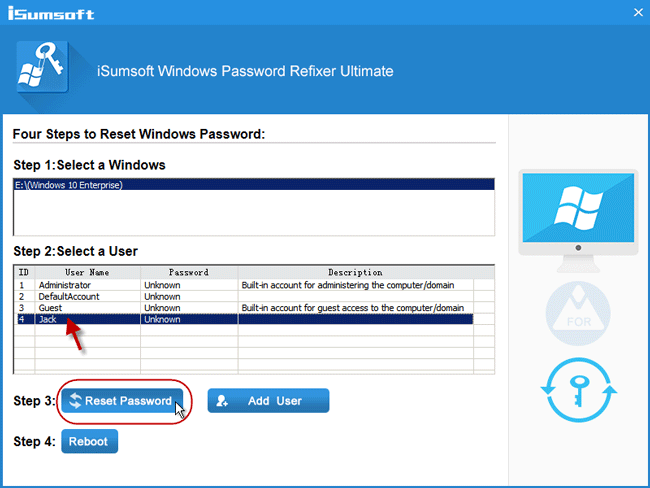
Reset Windows Password in Seconds
iSumsoft Windows Password Refixer for Android make it easier ti reset password to login Windows PC.
Sometimes, things may not go your way, but the effort should be there every single night. ”
SHENZHEN, GUANGDONG, CHINA, August 27, 2018 /EINPresswire.com/ -- Forgot Windows 10 login password? Find an easy solution to reset Windows password without re-installing your system and keep data on there safely? Windows Password Refixer - a well-equipped utility to reset the Windows Password definitely without re-installing your OS, easy and free! If you forget Windows local account password or Microsoft account password and unable to find any way to reset password, iSumsoft Windows Password Refixer should be a good choice.— Michael Jordan
Amazing Features
1. Reset all password
Remove all type of account password, including Admin password, user password, Windows server and Microsoft account password on Windows 10/8/7/XP/Vista.
2. Reset Server Password
It supports all types of Windows Server versions, such as Windows Server 2016, 2012, 2008 R2, 2003, etc.
3. Add New User
One clicks to add unlimited users and password to your Windows system!
4. Support UEFI
Fully compatible with both Legacy and UEFI-based computers, one key to start!
5. Easy to use
No special technical skills are required.
Amazing Benefits of Using Windows Password Refixer Tool - Find Out
1. Reset Any Windows User Account in Seconds.
If you seriously wish to take a leap of progress with your password recovery process, then WPRefixer would be the best choice to head on with. It not only keeps your system from re-installing the OS but prevents any loss of data from your computer. It completely removes the lock screen there with just 3 steps. Download - Burn - Reset.
2. More Option to Create a Password Reset Disk: Burn to USB disk and Mount to this phone.
3. Support UEFI-Based and Legacy BIOS.
There are many windows password recovery tools out there, but unfortunately, there are few really complete UEFI-supports on the market. Only Windows Password Refixer can be able to compatible both UEFI and legacy based BIOS on any computers. Automatically recognize your BIOS.
4. Support 300+ Computer Models and Tablets.
After having probed and researched for a long time, this iSumsoft Windows Password Refixer program has been compatible with almost all models of desktop and laptops, such as Dell, Toshiba, Lenovo, HP, Acer, etc.
•Lenovo
•Dell
•HP
•Acer
•Asus
5.Super Ease to Use.
Step 1: Download & install.
If you download WPRefixer to Android Phone, you have to rood that Android phone with SurperSu or other root management so that it gains root access.
Step 2: Create a password reset disk.
Follow its on-screen instruction to burn Windows password resetting IOS image to a blank USB flash drive or mount to Android phone.
Step 3: Boot your password-locked computer from the created password reset disk.
Step 4: Reset your Windows account password.
After PC boot from USB drive successfully, it lists out all accounts in your locked Windows. You can select a user account whose password you want to reset, and then click the Reset Password button.
Molly He
iSumsoft
+8615361062334
email us here
How to reset a Windows password with a password reset disk that created on an Android Phone.
Legal Disclaimer:
EIN Presswire provides this news content "as is" without warranty of any kind. We do not accept any responsibility or liability for the accuracy, content, images, videos, licenses, completeness, legality, or reliability of the information contained in this article. If you have any complaints or copyright issues related to this article, kindly contact the author above.
